Friday, April 7, 2017

How Austin Roberson Landed 25 New Clients Who Pay $299 Per Month Each (For a Total of $7500 in Recurring Revenue)

Meet Austin Roberson, who persuaded 25 people to join his $299 per month membership program, successfully generating $7500 per month in recurring income, with a Sales Page that Converts.

How did he do it?

Keep reading…

Austin is like most business owners. He founded the Studio Owners Academy to teach studio owners how to get and retain more students. And he’s good at it. His clients love him. But Austin only knew one way to sell his program, and it was time-consuming. Plus, he admitted that he was on the fast track to burning out.

And that’s when he thought about creating a sales page to sell his program.

He knew the benefits. He knew it would help him convert more people into customers. He knew his sales page would do most of the “selling” so he could free up his time to spend more time enjoying the life he built for himself…

…but he didn’t know HOW to create a sales page that converts.

And it wasn’t for lack of trying.

“I just wanted to convert more people.”

But when he created his first sales page, he admitted:

“I tried my best. It didn’t convert. For me, it was very bizarre.”

He went on:

“I didn’t know where to start… I banged out [a sales page] in a day or two and threw it up there. It was like I spent two days on something that had no point.”

So, what could he do?

Now, of course, he could just do what he always did. It was working, after all. But burn out was becoming real. So he only had 3 options:

Option #1: He could try to do it again, by himself, and run a real risk of failure. Again.

Option #2: He could hire someone to create a sales page for him, but how would he know who’s good or bad? And it’s expensive. Sometimes as much as $20,000 plus royalties.

Option #3: He could invest in an online course that showed him how to do it.
He chose option #3 and invested in Sales Page that Converts. He said:

“That’s what really made me want to buy [Sales Page that Converts]. The pain was so high. I had literally done a launch and, yet again, did not have a sales page that was converting.”

And here’s what happened…

How Austin Roberson Added $7500
of Recurring Revenue To His Business

When you create a Sales Page that Converts, you must answer one simple question: Should you sell your product or service outright? Or should you ask people to “apply to buy” your product or service?

Well…

Many people mistakenly believe that Sales Pages are just pages that persuade people to buy something. And don’t get me wrong. They do…

But what if you run a coaching program? Or sell high-end web design? Or take custom photography? Or, in Austin’s case, what if you sold a $299 per month monthly membership to Studio Owners? And, what if you don’t want anyone who’s anyone to buy what you sell. Maybe you just want the RIGHT people?

That’s when Austin learned that you could create a Sales Page that persuades people to “apply to buy.” And that’s what he did.

Step 1: He Created A Sales Page That
Asks People To “Apply To Buy”

And he promoted this through various channels. He promoted it on his existing website. He also shared it on his email list. Plus, he sent Facebook ads to this page.

All in all? 121 people applied to buy his membership that taught studio owners how to get and retain more clients.

Step 2: He Carefully Selected Less Than
50% Of His Applicants To Buy

He was happy about 121 applicants, but he knew not everyone would be a good fit for his program. So he carefully selected 50 people who were a good fit. These people, he thought, would be a perfect fit for his program.

Step 3: He Sent Those Approved
Applicants A Link To A Sales Page

If you start with an email list of 121 people, and 2% of people buy what you’re selling, you’re doing great. If you have 5% of people buy, you’re doing AMAZING.

But Austin Roberson showed us all up! He didn’t even email the full list of 121 people. He only emailed the 50 people he approved, and out of those 50 people… 16 people bought his $299 per month membership.

Or, in other words, he added $4800 in recurring revenue to his business as a direct result of the sales page he just created.

It gets better, too. Austin was happy with 16 people, but he was hoping 25 people would enroll. So, he did it all over again. He built up another small list of applicants, approved some of them, and sent them a sales page that asked them to buy. And he filled the remaining 9 spots, successfully adding a total of $7500 in recurring revenue to his business.

But How Did He Create
The Sales Page that Converts?

He enrolled in my course, Sales Page that Converts.

The question is, how do you make a sales page? And how do you make a sales page that persuades people to buy?

Everyone knows you need a headline. And testimonials. And compelling stories. And a clear description of benefits. And a good opening. And sub-headlines. And bullets.

But what order does everything go in? What stories do you share? How do you talk about your product and service in a way that makes people want to buy? And what if you don’t have testimonials yet?

The answer is found in Sales Page that Converts, my new course that shows you how to create high-converting sales pages… even if you’re not a writer… even if you’ve never created a sales page before.

Now, are you curious about Austin’s experience with Sales Page that Converts? Here’s exactly what he said:

“Before Sales Page that Converts, I was overwhelmed and confused on where to start. But now, I have an easily replicable process that I can use for all of my products. In the end, I have to reach my customers to make an impact. And they have to buy my product to get the results they deserve. This course helped me accomplish that faster and easier than it’s ever been in the past.”

And he went on:

“I didn’t know how valuable a sales page was. I did have a system that was working and it was easily duplicable, but this is so much easier. For me, this course has really changed the way I run my launches.”


source http://feeds.socialtriggers.com/~r/SocialTriggers/~3/Nunr3e2PZlQ/

How Benjamin Houy Wrote a Sales Page that Increased His Revenue By 21% – In A Market Dominated By Big Companies

The language-learning industry is fierce. It’s dominated by multi-million dollar corporations. These are companies with huge advertising budgets. They have books and software on every e-commerce platform and in every bookstore on the planet.

It’s the sort of market that seems IMPOSSIBLE to penetrate.

Benjamin sells an online course that teaches people how to speak French. He doesn’t have a lot of money to spend on advertising. He doesn’t have a dedicated, full-time marketing team. He runs a one-man operation.

How could he possibly compete?

He has dreams of creating more products and growing his business. But his sales had hit a plateau. He has a great product that really helps people. But his sales page just wasn’t converting well enough to take his business to the next level.

And that’s when he enrolled in my online course, Sales Page that Converts.

“I had been following Social Triggers for a few years already … I really thought Sales Page that Converts would be ideal to improve my sales page and learn about marketing in general.”

And what happened?

Benjamin created a sales page that increased his revenue from his online course by 21%.

The best part?

Benjamin no longer has to stress about where the money is coming from. He now has peace of mind knowing that his sales page is running on autopilot to make him sales everyday. This frees up his time to create more products and grow his business.

Here’s how he did it…

“I Didn’t Know Why People Were Buying My Courses”

The biggest mistake Benjamin made in creating his first sales page occurred before he even wrote one word of copy.

“When I did the sales page for the first time, I basically wrote everything in five hours without researching anything.”

Benjamin skipped the most important step in creating a sales page that converts: the customer research.

This is a mistake that so many people make. And it drives me CRAZY.

People are so eager to start making sales that they slap a sales page together and hope for the best. Then, when they make no sales, they’re left scrambling to figure out why.

But before you create your sales page, you must deeply understand who your customers are and what they’re struggling with.

That’s why I show you how to do customer research the right way in Module 1 of Sales Page that Converts. I show you how to uncover hidden insights about your customers. Then, I show you how to use those insights to write sales copy that makes your ideal customers think, “It’s like they’re reading my mind!”

Benjamin THOUGHT he knew his customers. But in reality, he only knew the surface-level stuff.

He knew his customers wanted to learn French before a trip to France. But he didn’t know what was really driving them to want to speak French.

“Before [Sales Page that Converts], I thought that people want to learn French because it sounds nice. I realized, actually, that most people who buy the course are people who went to France already and had a bad experience because they couldn’t really communicate and they were frustrated.”

This was a huge ah-ha moment for Benjamin.

He learned that his customers don’t want to learn French just because it sounds nice. They want to learn French because they suffered through a previous humiliating and frustrating experience. And they wanted to ensure they never had to live through that experience ever again.

Benjamin also learned that his ideal customers weren’t clear on exactly what he was selling. And they weren’t buying because of it.

“Before [Sales Page that Converts], I was always saying to people that my course and my website are about helping you learn French grammar naturally. When I interviewed customers, I realized that nobody really cared about that so much … Not a single person talked about that.”

He was selling people something that they didn’t actually care about. His course teaches people how to speak French based on real-life conversations. Yet, he was telling people that he would teach them French grammar. And it was hurting his conversions.

“I moved away from saying ‘learn grammar naturally.’ And instead, I say, ‘learn real-life conversations’ because almost every customer I interviewed told me it was the reason they chose to buy the course.”

And as you can see below, his copy is much stronger because of it.

He writes:

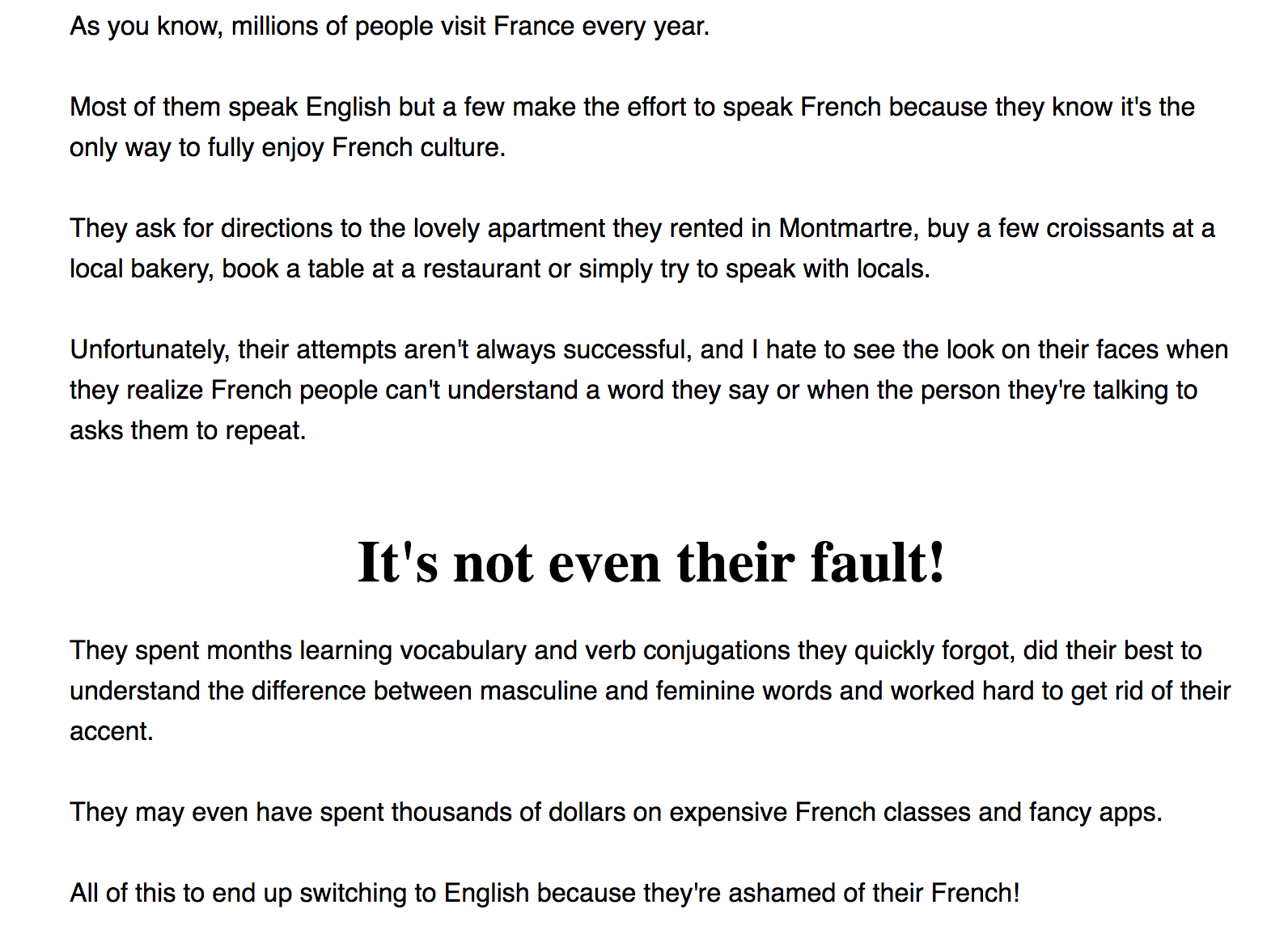
“They spent months learning vocabulary and verb conjugations they quickly forgot, did their best to understand the difference between masculine and feminine words, and worked hard to get rid of their accent.

They may even have spent thousands of dollars on expensive French classes and fancy apps.

All of this to end up switching to English because they’re ashamed of their French!”

This speaks directly to his customers’ frustration. They’ve wasted time and money learning French vocabulary and grammar that proved useless in real-life situations. They’ve felt embarrassed and ashamed trying to speak French and failing.

So, when they read this, they know Benjamin really understands their struggle. And they believe that he can help them solve it.

Insights like this can be the difference between a sales page that bombs and a sales page that converts over and over again. And I teach you how to do it in Sales Page that Converts.

Assembling Your Sales Page Is Easy With This Foolproof Framework

One of the biggest problems Benjamin faced when he created his first sale page was that he didn’t know what he should include and where to put it.

He had previously purchased a copywriting ebook to help. But it didn’t make the whole sales page process any clearer.

“There were a lot of examples in the book. So, I just kind of copied what I saw and tried to adapt it for my products. I just put everything together, but it didn’t really explain the reasons for why you needed to do things.”

He had a lot of tips and tactics. But he didn’t understand how they all tied together to form a cohesive, persuasive sales page.

The end result was a sales page that just didn’t feel right and didn’t convert as well as he knew it should.

“I thought that the whole thing was a bit needy … I felt the copy on the page wasn’t really flowing and that something was missing.”

That’s why Sales Page that Converts gives you a foolproof framework for creating a sales page. I give you all the building blocks you need to include on the sales page. And I walk you through how to create and assemble them step by step so you don’t miss anything.

This was huge for Benjamin.

“A lot of courses aren’t very clear. You watch a lot of videos, but you don’t really know what to do. With this course, it was much more structured. So, I knew I just had to follow all the steps and, at the end, I would have my page ready … I would just have to follow the plan and it would work.”

Having this proven framework meant that Benjamin didn’t have to figure out what works by trial and error. He didn’t have to second-guess his decisions. He just had to follow the framework, and he could create a sales page that converts.

During this process, Benjamin was able to revamp the sections of his sales page he already had. And he added some key components to his sales page that he was missing.

First, he realized that his customers had no clue what they were actually buying from him.

“People weren’t really clear about what I was actually selling. They didn’t know if I was selling a DVD, or a CD, or if I would send them something, or if it was digital.”

This is a huge problem. If people don’t know what they’re actually buying, they’re simply not going to buy.

Now, thanks to Sales Page that Converts, he has a revamped “How It Works” section that includes all the nitty-gritty details about his course. So, his customers are never left wondering what they can expect to receive if they enroll.

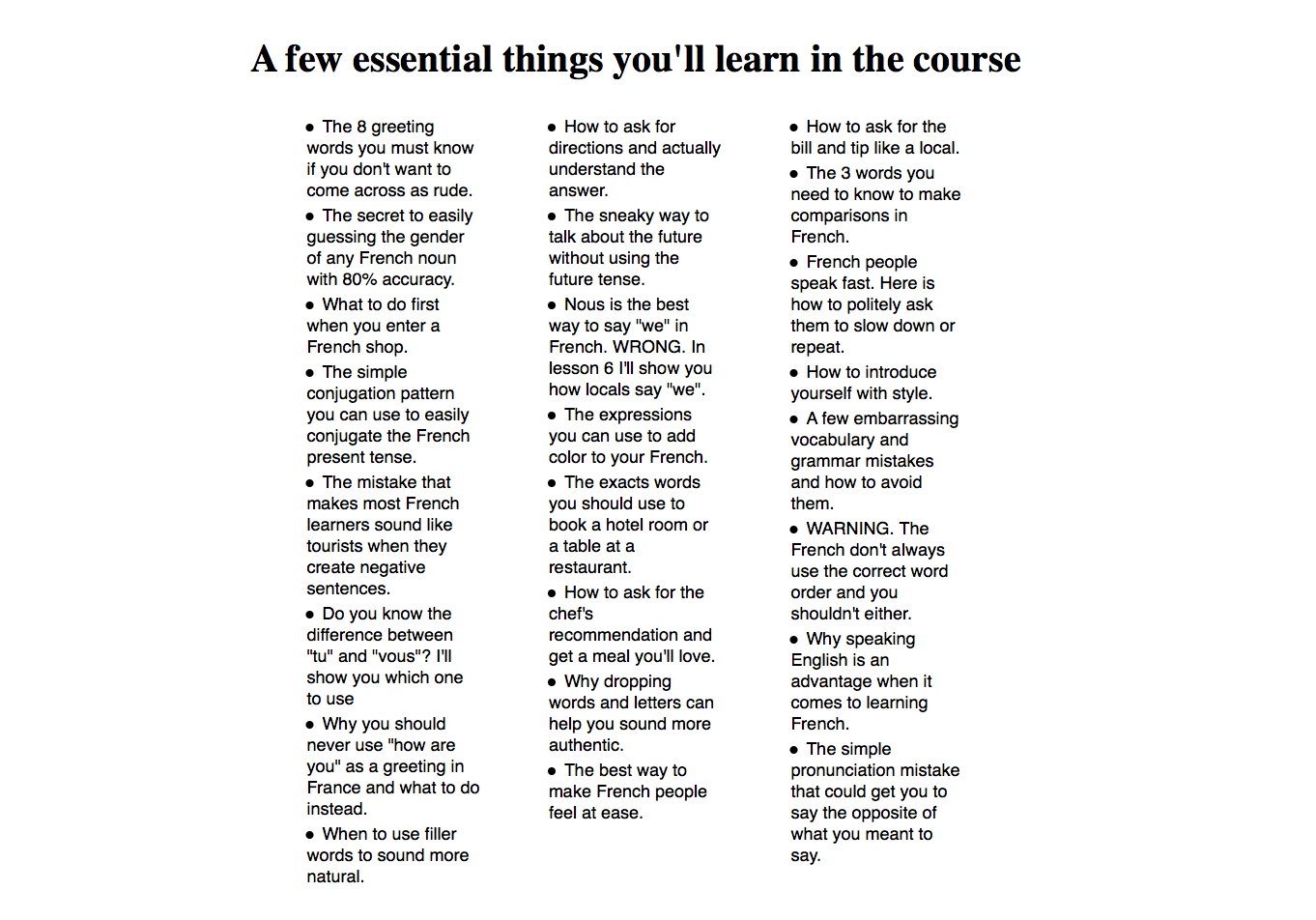
Benjamin also added clear, benefit-driven bullet points in his course description.

“I didn’t have bullet points on the previous page because I didn’t know how to make them sound interesting. Sales Page that Converts helped me write bullet points to create curiosity and get people excited to explore my course.”

In Sales Page that Converts, Benjamin learned how to write benefit-driven bullet points that make his prospects’ ears perk up.

As you can see, even with a simple design, these benefit-driven bullet points speak directly to his ideal customers. They create curiosity so that his prospects just need to know more.

And finally, Benjamin added what I like to call “The Wake Up Call.”

“The Wake Up Call” is a simple strategy you can use on your sales page to create a sense of urgency for your prospects to buy. And I show you exactly how to create this section and where to put it inside the course.

After Benjamin created all the “Building Blocks” of his sales page, the rest was smooth sailing because he had a template for assembling his Building Blocks in a strategic way, piece by piece.

You see, your sales page is really just a conversation between you and your ideal customers. And you want that conversation to logically and seamlessly convince your ideal customers that your product or service is the right fit for them.

With the Sales Page that Converts framework, this really is as easy as plugging each Building Block into the template. This way, you don’t have to worry about what goes where and why. I give you the structure to ensure that your sales page is designed to convert browsers into buyers.

Plus, I also include html sales page templates so you can get your sales page up and running as quickly as possible.

Benjamin was able to revamp and release his new sales page quickly and seamlessly. And the results have been amazing!

A 21% Increase In Revenue With Sales Page That Converts

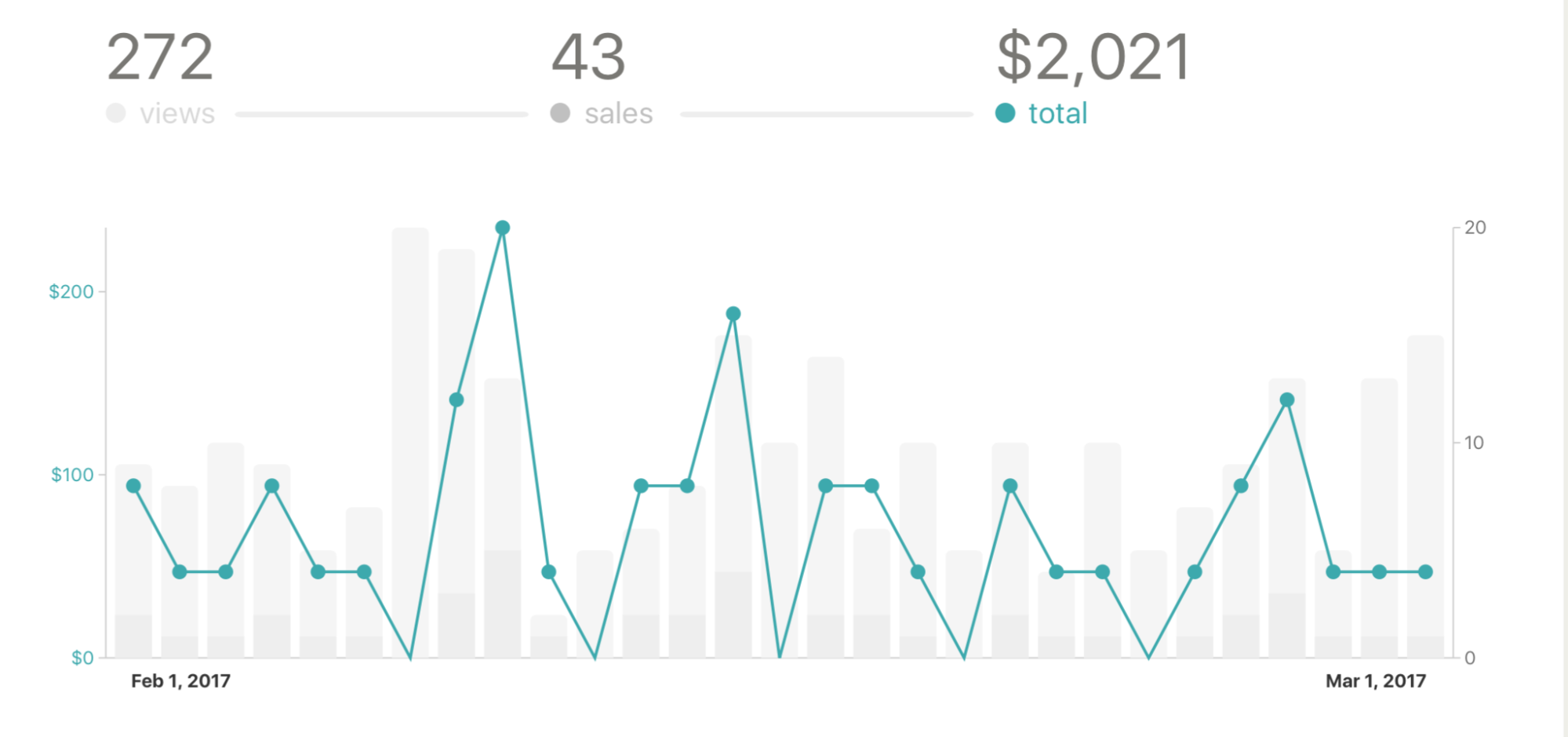
Benjamin launched his course with his old sales page for the last time in January 2017. He earned $1,668 in revenue from that launch.

Then, in February 2017, Benjamin launched his course again using his NEW sales page that he created with Sales Page that Converts.

And guess what happened?

His revenue increased from $1,688 in January to $2,021 in February.

The best part? His website traffic was down in February compared to January.

So, he increased his revenue by 21% with LESS traffic!

Now that he has a sales page that’s converting well, it basically runs on autopilot. This means that he can use this sales page to generate sales over and over again.

This is a HUGE change for someone who previously spent too much time tinkering with his sales pages, grasping at straws to increase his conversions.

“Sometimes I would wake up and change half of the sales page and see how it went, which was pretty much always a terrible idea.”

Now that he has a sales page that sends a consistent, powerful message that resonates with his customers, he barely has to lift a finger.

“Now, I will just change a small amount on the page. And sometimes, I touch nothing on the page for two weeks.”

This enables him to generate passive income, giving him peace of mind and freeing him up to grow his business.

“I Can Focus On Other Business Knowing The Sales
Page Will Always Be There To Sell”

So, what’s next for Benjamin?

With his sales page in order, Benjamin has put all his energy into product development and growth for his business…

“I’m entirely focused on link-building, writing articles, and creating products. Now that I know the sales pitch is covered, I can just relax without having to worry that I won’t have enough sales this month.”

Now that Benjamin has a high-converting sales page in place, he doesn’t have to stress out about where the money is coming from. He knows his sales page is going to keep converting browsers into buyers. This frees him up to create new products and grow his business.

Benjamin’s story is a testament to the power of a high-converting sales page.

With a sales page that converts, you don’t have to worry about where your next paycheck is coming from. You’ll know that you have a system in place designed to automatically convert browsers into buyers. You’ll have more free time that you can spend with your family and friends or take a vacation. And you’ll have more time and more money to invest back into your business.

So, don’t let this opportunity slip by. Join Sale Page that Converts so you can transform your business and your life.

[Join Sales Page that Converts Today]


source http://feeds.socialtriggers.com/~r/SocialTriggers/~3/dtpaEFrn_yQ/

How Ben & Cole Earned $49,316 With Their First Online Photography Course

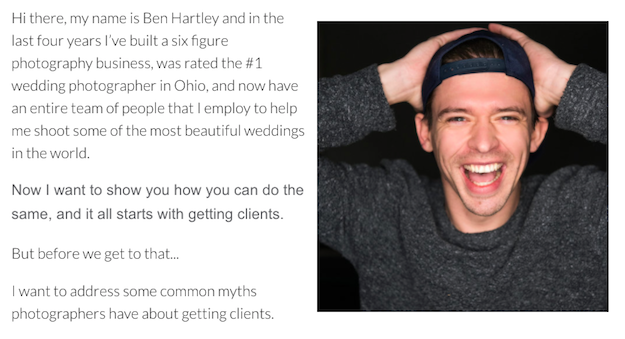
Ben Hartley and Cole Eutzy were six weeks away from launching their first online photography course.

Cole, a marketer at his day job, wasn’t new to copywriting. But the last thing he wanted was for their course to bomb because their sales page didn’t work.

And then there were the THOUSANDS of online photography courses being sold in a crowded market.

Ben and Cole KNEW they had an amazing course…

But they were worried it would get lost in the noise when it launched.

Then Cole received an email from me about my online course, Sales Page that Converts.

It was perfect timing…

“I’ve always been interested in what people above me are doing. So, to get access to Derek’s sales page framework was worth it.”

It went down to the wire, but Ben and Cole were able to create their Sales Page that Converts just in time.

The results?

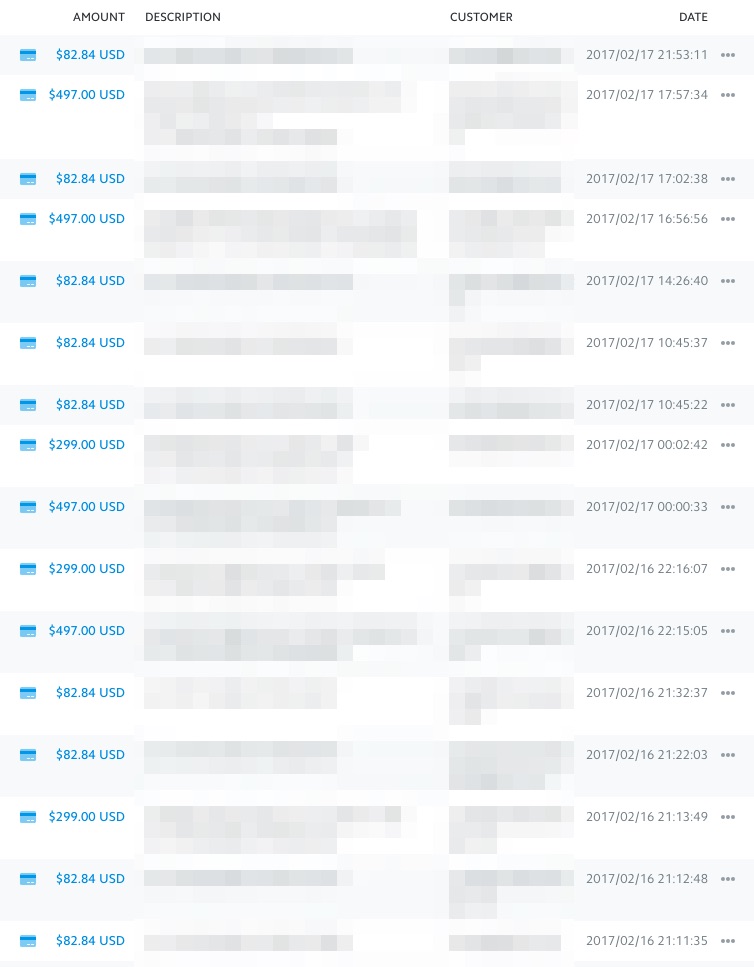
  • They had their biggest launch ever! They pulled in $49,316 in invoiced revenue from their online course.
  • They created a “high-end” version of their course for $796 – an increase of 60% over their $497 standard course package, which 19% of their customers opted for.
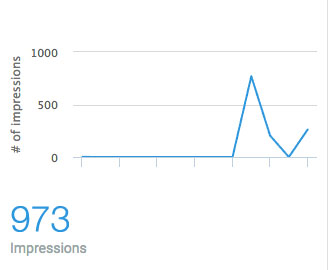
  • Their sales page had a conversion rate of 9.1% based on 973 impressions and 89 units sold.

How did they do it?

By following the easy, step-by-step framework in Sales Page that Converts…

How To Stand Out In A Sea Of Competitors

Ben and Cole were worried about separating themselves from the from the thousands of photography courses on the internet.

I totally get it…

I see online ads for photography courses all the time and I don’t know anything about taking pictures!

But here’s the truth: competition is actually good.

It means there’s a lot of people with money who want to buy what you’re selling.

The problem?

People get intimidated by competition and they panic. So, they try to appeal to everyone because they don’t want to miss out on any customers.

But this is the kiss of death…

If you try to please everyone, you’ll end up pleasing no one.

Instead, Ben and Cole simply had to answer the one question all potential customers ask…

“Why should I buy from you?”

And in Sales Page that Converts, I showed them the exact technique I use to answer this question for all of my products.

Ben and Cole had to explain HOW they’d deliver on the promise of their course, which was getting more photography clients.

“It really forces you to think about some of the other ways you can create a narrative around your product.”

After considering their options, they both realized their ace in the hole was Ben.

Ben was rated the #1 wedding photographer in Ohio and built a six figure photography business in 2 years. With that kind of resume, what photographer wouldn’t trust him?

As Cole explained:

“All these other photographers run websites teaching people how to market their photography businesses when they don’t even have a very successful photography business. We’re not making our money telling people how to market their photography business. Ben is actually doing it – and that’s our big difference.”

The lesson here is that you can’t try to appeal to everyone. You have to show HOW your product is different from the competition’s.

But to create a Sales Page that Converts, you can’t just show how your product is going to deliver… You must also remove the obstacles that prevent your prospects from becoming paid customers.

This was the next big change Ben and Cole made to their sales page…

Mythbusting Your Way To More Customers

When Ben and Cole got to Module 3 of Sales Page that Converts, they realized their sales page was missing a huge piece of the puzzle.

They didn’t address any false beliefs people might have about the photography business.

All sales pages tell you why you SHOULD buy their product or service. But most people don’t put themselves in their customers’ shoes.

If you want a sales page that converts, you have to address the reasons why a prospect WOULDN’T buy from you.

This was a big a-ha moment for Ben and Cole.

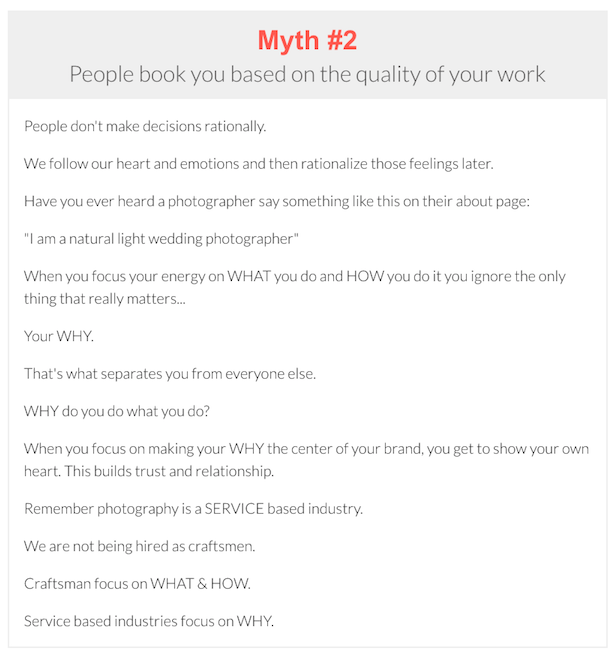
“One of the main things I added to the sales page that I didn’t have before I took the course was the section on myths. That was a huge part of the sales page that was lacking.”

Myths are simply false beliefs your prospects have about your product or service.

In the sales page, Ben and Cole debunked the three biggest myths photographers believed about their business.

Ben and Cole’s sale page now addressed customer objections before their prospects even thought of them. This gives the impression you’re reading their minds, which Cole loved:

“I really loved how [Derek] addresses myths, and how to dispel them before you get into your offer. That was one of my biggest takeaways from the course.”

To boost conversions even more, Ben and Cole made two more important changes to their sales page.

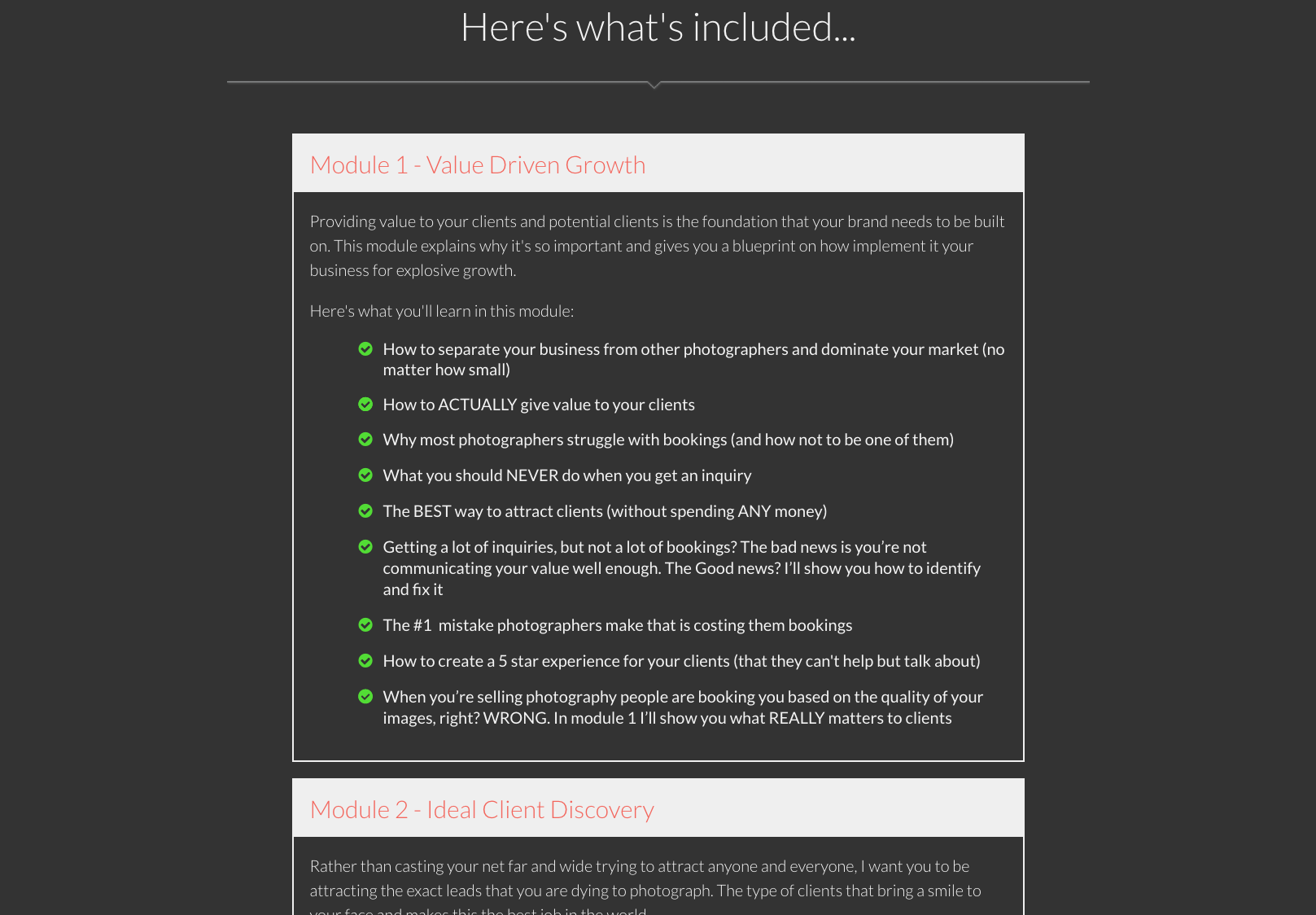
Change #1: They Added Bullets About Benefits (Not Features)!

Showing off what’s in your product or service feels good, but it’s not what your prospects care about.

The only thing they’re thinking is, “How does this benefit me?”

Ben and Cole realized that their sales page didn’t answer this well.

Sales Page that Converts helped them to write clear, benefit-driven bullet points that make their prospects’ ears perk up.

This was one of Cole’s favorite lessons in the course:

“[Bullets] are my favorite. That’s why they’re part of our sales page and I definitely took a lot from that video. I actually haven’t found that much good content on how to write good bullet points. Derek’s was actually one of the better ones I’ve ever seen.”

Change #2: They Created An Advanced Version Of Their Course

Ben and Cole learned in Sales Page that Converts that adding a high-end version of your product or service increases conversions.

Why?

Because it changes your customers’ decision from “should I buy?” to “which option is best for me?”

So, Ben and Cole created an advanced version of their course that shows you how to price your photography to maximize revenue.

They priced it at $796, a 60% increase over their core offer at $497. 19% of their customers purchased the advanced option, earning them $5,083 in extra revenue!

$49,316 in Invoiced Revenue… With A 9.1% Conversion Rate

Ben and Cole’s first launch after completing Sales Page that Converts was their biggest launch yet, with $49,316 in invoiced revenue.

Their sales page had a 9.1% conversion rate based on 973 sales page impressions and 89 units sold.

“I think we ended up with a 9.1% conversion rate for people that hit that page, which I’m really happy with. I definitely think the improvements I made because of [Sales Page that Converts], and specifically adding the myths section and fleshing that out made a huge difference on our sales.”

Ben and Cole are already revisiting Sales Page that Converts to launch their course again in the fall and their bi-annual live workshop.

“I Already Recommended It To My Friends”!

Even though Ben and Cole were only six weeks away from their launch, they didn’t hesitate when they saw Sales Page that Converts:

“The main reason I bought it was to get access to Derek’s framework. Before, I didn’t have anything written out. I was just like, ‘Oh I need this, this, and this,’ in my head.”

Cole also loved the worksheets that go with the lessons in Sales Page that Converts…

“I love the worksheets. That’s my favorite part. That is the framework. I use them. I love them. I remember thinking about how detailed they were. They’re a good length to not be overwhelming.”

With the simple, step-by-step framework of Sales Page that Converts, Ben and Cole were able to have their most lucrative product launch yet.

“[Sales Page that Converts] is completely worth it just to get access to Derek’s framework. It definitely works. He is definitely several steps ahead of where most people are with their sales pages and their business. And to see what people way above you are doing is incredibly valuable.”

You have the same opportunity in front of you right now.

What are you waiting for?

[Join Sales Page that Converts today]


source http://feeds.socialtriggers.com/~r/SocialTriggers/~3/2HG5Dt9dVpA/

Wednesday, April 5, 2017

How Lisa Wrote A Sales Page that Earned $21,861 In 4 Months (The best part? She did it while she was 9 months pregnant)

Her time was running out FAST. At 9 months pregnant, Lisa Phillips knew her baby was on the way, and she needed to start making more sales.

The problem? Lisa is a real estate investing coach who teaches people how to invest in rental properties, but virtually no one was buying her online course. She explained…

“Everything else was in place. I had a good traffic source. I had people who liked and trusted me. I received feedback that [my course] is what they needed. But then, no one would purchase it!”

She was baffled. She had traffic. She had trust. She had a product. But her sales page just wasn’t converting people like she thought it should…

…And that’s when she enrolled in my online course, Sales Page that Converts.

She only had a few weeks before the baby was due, but she went through the course, revamped her sales page, and here’s what happened:

  • In 4 months from joining the Sales Page that Converts, she made $21,861 in invoiced revenue from a small email list. (She only had 1,500 subscribers when she joined).
  • Lisa increased the price of her course from $297 to $497 – a 67% increase. And even though she struggled to sell her course at a cheaper price, she was successfully selling her course for more money… with less headaches.
  • Plus, Lisa launched a “high-end” version of her course that she offered for a one-time payment of $997 – more than 300% higher than her original course. And it sold well.

So, what exactly did she do?

Here are the full details…

Before She Wrote One Word Of Her New Sales Page,
I Showed Her The Most Important Thing She Needed To Do…

When Lisa created and launched her first sales page, she had a sad, heartbreaking realization… nobody bought anything. So, she KNEW something had to be wrong…

…But what was it? And how could she fix it?

When most people think about improving their sales page, they often do tedious little things like changing button colors, tweaking headlines, and doing all sorts of “micro-changes” with hopes of finding the one thing that will magically increase conversion rates.

Newsflash: this never works.

Luckily, Lisa joined Sales Page that Converts. So, she didn’t waste much time pursuing this fool’s errand.

So what did she do?

I always tell people, before you write one word of your sales page, you must answer the question: “Who will be reading that sales page?”

And that’s when Lisa discovered her first mistake.

When she wrote her sales page, she assumed she knew what her customers wanted. But when she used the research techniques I share inside Sales Page that Converts, she discovered almost all of her customers wanted one thing…

…and she never mentioned that thing on her sales page.

NOT ONCE.

She even admitted, “I enjoy [that one thing] as well. I just personally would not have [said it on my sales page].”

Now, you might be wondering what that thing is, but it’s largely irrelevant to you. The one thing that her people want may not be the one thing that your people want.

So, the lesson is this: it’s okay to make assumptions about your customers, but you should always validate those assumptions with the right research techniques. If you don’t, you run the risk of leaving out something important on your sales page… just like Lisa did.

If you want to learn more about how Sales Page that Converts can help you with customer research, read this page right here.

Then She Made 4 More Important Changes To Her Sales Page

Once Lisa discovered the “real reason” behind why people wanted to buy her online course, she proceeded to make 4 more important changes to her sales page.

Change #1: She Increased Her Prices By 67%

How much should you charge for your product or service?

You have a gut feeling about what you should charge, but sometimes you think a “high price tag” might scare potential customers away. So, you devalue your work and lower your price.

But, as Lisa learned in Sales Page that Converts, this is a bad strategy. So, she used the “Same Outcome Approach” to pricing.

And this was a game-changer for Lisa.

She realized that she wasn’t charging enough for her course. So, she increased her price from $297 to $497 (and she increased it again to $597 in 2017).

Change #2: She Offered Payment Plans

When Lisa created her sales page, she only offered one payment option. People either bought it or didn’t buy it. But Sales Page that Converts recommends that people test a payment plan and a full payment plan.

And what happened?

80% of her new customers opted for monthly payments. But more than that, Lisa gained peace of mind:

“My life has definitely changed because of that residual income [from payment plans].”

This means, less time working and more time she can spend with her family.

“The payment plans have been making my life so much less stressed. I don’t feel the urge to always have to GO. I woke today to one of the payment plans. And I felt like ‘even if I do nothing today, I did my work.'”

Now, of course, creating payment plans for your products and services might seem scary… “because how do you know if people will even pay?”

But we cover all of that – and more – inside Sales Page that Converts.

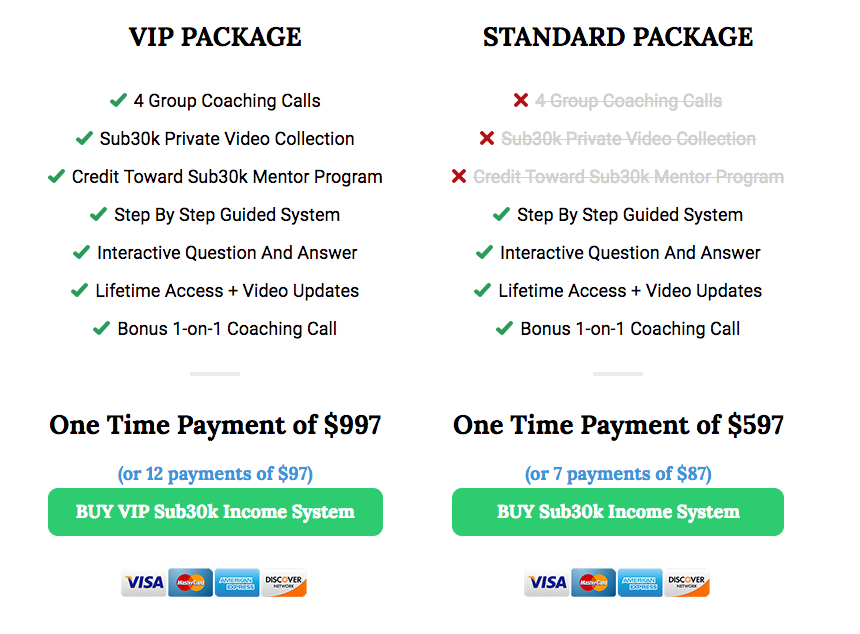
Change #3: She Created A “VIP Package” For Her Course

Lisa also created a VIP package in addition to her standard package. She learned in Sales Page that Converts that adding a high-end version of your product or service increases conversions.

Why?

Because it changes your customers’ decision from “should I buy?” to “which option is best for me?”

As you can see from the screenshot above, Lisa added four group coaching calls, bonus videos, and a credit towards a monthly membership that she sells for her VIP package. And she sells it for either a one-time payment of $997 or 12 monthly payments of $97.

Change #4: She Switched Her “Sales Method”
From Evergreen to a Product Launch

Finally, Lisa completely overhauled the way she sold her course online. She switched from an “evergreen” model – where her course is available for purchase all the time – to a launch model – where she opens and closes enrollment for her course on specific dates.

While this is outside the scope of the Sales Page that Converts training, Lisa turned to the Sales Page that Converts copy coaches for some advice.

She had heard that the launch model would increase her conversions but she didn’t trust everything she read on the internet about it.

“I didn’t trust what I read about it out there in the internet world. It just seemed to be all over the place.”

So, she reached out to our copy coaches, and they set her straight.

“I decided to switch over to the product launch. That was after a few emails back and forth with the support team on what the pros and cons were.”

And that’s the kind of support you can expect when you enroll in Sales Page that Converts.

“That was part of the reason I bought Sales Page that Converts, when Derek said I could email his support team. The fact that Derek trained his staff on all these particulars, I felt comfortable talking to them. That was a big part of me getting the course.”

And it’s a good thing she did because it completely transformed her business and life.

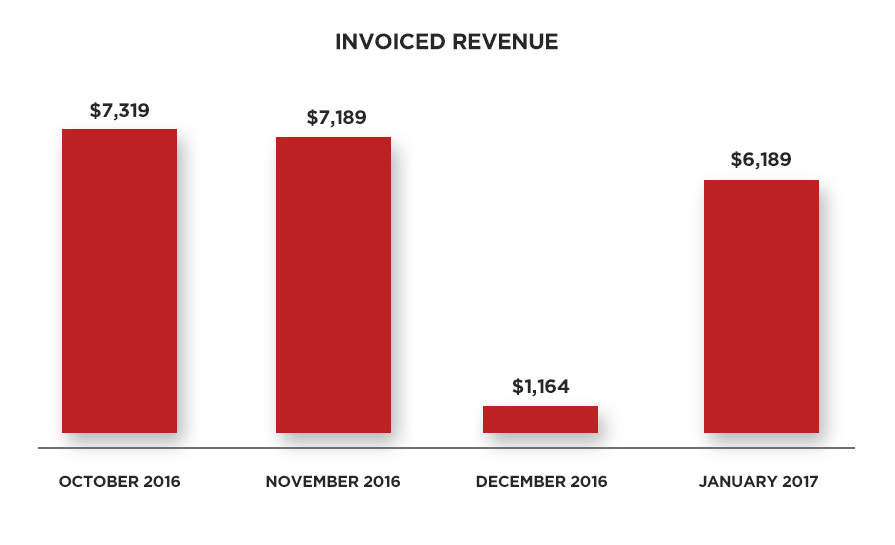
$21,861 in Sales in Four Months – From a Small List

Since enrolling in Sales Page that Converts, Lisa’s sales have been soaring.

Here are the exact results:

The best part?

She did it all with a small email list!

Most people mistakenly believe that they need a huge email list to be successful online. This couldn’t be further from the truth, and Lisa is proof of that.

“When I started [Sales Page that Converts], I was at 1,500 subscribers. Now, I’m at 2,200. You don’t need a big email list at all.”

And she’s right.

It’s never about the size of your email list. It’s always about the quality of your email list… and whether or not you hit them with the right offers. And Sales Page that Converts can help you with the sales pages for those offers.

But success was always about more than just the money for Lisa.

It’s about spending more time with her daughter:

“My life now is a little bit less hectic. I don’t have to work the midnight shift every single night … I can pick my daughter up from daycare at 1 o’clock, like I did today, instead of 6 o’clock.”

It’s about having the freedom to plan vacations with her family while having the peace of mind that money will still be coming into her business:

“I have a travel bug, so I actually have three vacations planned. They’ll be working vacations, but one will be in Virginia Beach, one will be in the Outer Banks, and one will be on the beaches of Michigan. I’m looking to do a cruise with my husband and my little daughter, who will be one year old at that point. The vacations, which is a large part of my motivation, has definitely upped its game this year!”

And most of all, it’s about seeing her customers succeed:

“You inspire others by putting your nose to the grindstone … Our success leads to other successes for other people, and that’s a big deal. I love all the work I put into it, and I’m glad that it pays for itself with people investing in my product to help themselves. It’s a beautiful circle.”

Are you ready to transform your business and your life?

You’ll need a sales page.

And I can show you how to make one.

So, keep an eye out for an email that announced Sales Page that Converts next week!


source http://feeds.socialtriggers.com/~r/SocialTriggers/~3/YadOaPl9v7E/

How to Optimize Your Blog for the Mobile Shift

Is your blog optimized for mobile devices?

Are you considering using Google AMP, Facebook Instant Articles or Apple News?

Listen to This Episode

In this post, we explore these new platforms and what they mean for bloggers.

The Research

In 2014, we reached a pivotal point in mobile device usage. According to Morgan Stanley Research, mobile device users surpassed desktop users.

Global Users

Global Users

In October 2016, more users accessed the internet from mobile devices and tablets than desktops.

Mobile Browsing

Mobile Browsing

What this shows is that the world is getting increasingly mobile. This is a great thing, but there is one significant problem.

The Mobile Dilemma

Slow Mobile Web Experience

Slow Mobile Web Experience

As much as users love using their mobile devices to access the web, the experience is slow.

The average U.S. retail site takes 6.9 seconds to load. The average link clicked in the Facebook mobile app takes 8 seconds.

And according to a study by Akamai, 40% of users will leave your site if it takes more than 3 seconds to load.

As bloggers, we need to be thinking about this as we think about our mobile users.

Google, Facebook and Apple

One thing for sure, the big players in the industry are paying attention to this mobile dilemma.

Google has rolled out Google AMP, Facebook has Instant Articles and Apple is going all in on Apple News.

It's obvious that these big companies are going all in on mobile.

They want to control the mobile browsing experience because that would be profitable.

Follow the general progression

It's interesting to take a step back and think about the general progression.

First, they announced these new mobile browsing experiences with select partners.

These partners are usually big media sites. This is a great way to “test the waters” and get lots of users engaging with these new platforms.

These partners usually get some special designation – the lightening bolt on Facebook Instant Articles and Google AMP.

After a few months of testing, they begin rolling it out for all publishers.

During these stages, there is usually a clear statement that there will be no preferential treatment for these sites.

However, data is collected and published to demonstrate how beneficial the technology is for users.

For example, Facebook has reported that Instant Articles load 10x faster, are read 20% more and 70% less likely to be abandoned.

With Google AMP specifically, there is already a demonstration of preferential treatment for big news sites using AMP.

Those sites get prominent placement in cards above the regular search engine results.

My prediction

These companies are building a strong case for why sites using their alternatives are good for users.

If they compile enough data to show that the user experience is better, the next logical step is to give users more.

In the future, these factors will play heavily into the algorithms.

This can be good for bloggers who use these technologies, but it does have some downsides.

What are the downsides?

Downsides of Using the New Features

Downsides of Using the New Features

The biggest downside is that you are giving up some level of control with your content. Here's what I mean:

  • With Facebook Instant Articles, your content loads within the mobile app. People are no longer leaving the app to visit your site.
  • These platforms limit your design and branding elements.
  • There is no sidebar in these technologies. So your important banners and links in your sidebar won't show up.
  • They remove some code to speed up your site. This can result in certain features of your sites not working (i.e. some WordPress plugins).

One of the things I love about what we do as bloggers is that we are in full control of our blogs. Using these technologies, you are giving up some of that control.

While the technologies may be beneficial, it's often hard to trust these big companies.

Will they make changes in the future that affect our bottom lines? I guess that's left to be seen.

Google AMP vs Facebook Instant Articles vs Apple News

Now that we understand the goal of these platforms, let me highlight a few of the differences.

  • Google AMP vs FB Articles vs Apple News

    Google AMP vs FB Articles vs Apple News

    Difficulty: Of all three, Facebook Instant Articles is the most difficult to set up. Google AMP and Apple News are relatively simple to get going.

  • Hosting: Google AMP creates a separate version of all of your posts that's hosted on your own server. Instant Articles are hosted completely within the Facebook Mobile app. Apple News acts as an RSS reader pulling in your feed.
  • Analytics: AMP is tracked as a separate property in Google Analytics. Facebook uses their Facebook Insights. Apple News Publisher has it's own analytics.
  • Paywalls: AMP and Apple News both allow you to have paywalls. Instant Articles doesn't.
  • Multiple platforms: AMP is an Open Source project done in collaboration with many other companies. It isn't limited to Google and will be used by sites like Twitter, Pinterest and many others. Instant Articles works only within the Facebook mobile app. Apple news works only on iOS devices.
  • URLs: Google AMP creates a separate URL for each AMP post/page. Instant Articles and Apple News both pull in your content from the original URL/feed.
  • Interactivity: Facebook Instant Articles includes more interactive elements like slideshows, likes and comments on images, audio captions, autoplaying video, interactive maps and tap to expand images. The others don't. However, they do support media files.

How to Get Started

Now lets briefly cover how to get started on all three platforms. The following steps are for bloggers with a self-hosted WordPress site.

Facebook Instant Articles:

  • Sign up for Instant Articles
  • Install and activate the “Instant Articles for WP” Plugin
  • Connect WordPress to your Facebook Page
  • Develop and submit your sample articles
  • Start Publishing (manually or automatically)

Google AMP:

  • Install the AMP plugin
  • Create a separate property in Google Analytics
  • Install and configure the “Facebook Instant Articles & Google AMP Pages by PageFrog” plugin
  • Verify your implementation in Google Search Console

Apple News:

  • Signup for the Apple News Format in News Publisher
  • Wait for their approval (1 – 2 weeks last I checked)
  • Install the “Publish to Apple News” plugin
  • Connect the plugin to the Apple News API
  • Indicate Post types to publish to Apple News and configure appearance

My final thoughts

Yes, there are big changes coming to the mobile web, and blogging in general.

The worst thing we can do is to keep our heads under the sand and act as if nothing's happening.

My plan is to be proactive share what I learn with you.

If you do decide to experiment with these technologies, you should take a content-centric approach.

This is an approach that views your content as the important factor for growing your audience.

This view holds that it's important to get your content to your audience where they are, as opposed to a blog-centric approach.

It's essential for us to use that content to grow your email list. It's not enough that people consume your content. You want them to take the next step.

That's the step where you can provide them with more value. It's also the step that builds your business and not just these big companies' businesses.

Our goal is to figure out how to do this well.

A Few Questions:

  • What do you think of these technologies?
  • Will you use them for your blog?
  • What concerns do you have?

Resources:

Infographic

The post How to Optimize Your Blog for the Mobile Shift appeared first on Become A Blogger by Leslie Samuel.


source http://www.becomeablogger.com/24586/optimize-blog-mobile-shift/

Thursday, March 30, 2017

How to Write a Blog Post – The Ultimate Guide

Blogging is a battle.

A war to get your ideas the attention they deserve.

Your enemy? The dizzying array of online distractions that devour your readers.

This battle is not for the faint of heart.

There are so many learning curves. Plugins you’ll need to install. Social networks you’ll need to employ. Marketing techniques you’ll need to try.

But none of that stuff matters if you’re drowning your ideas in amateur writing. You might as well lay your sword down in defeat. Readers don’t have time for amateurs.

So before you venture any further down the blogging rabbit hole, you better make sure you know how to write like a pro.

Skip that step, and nothing can save you. Your battle is lost.

The good news is, writing effective blog posts is a skill you can learn. And it’s one you must learn.

You have powerful ideas that can transform readers’ lives. Those ideas are worth fighting for.

So when you’re ready to enter the arena, arm yourself with this guide and fight the good fight.

Your readers are counting on you.

Step 1: Craft a Headline That Readers Can’t Resist


Want to know one of the biggest mistakes bloggers make?

Writing the post before the headline.

Without a headline, they have no roadmap to follow. And so their post goes in multiple directions, leaving readers feeling dizzy, confused and disoriented.

And then they try to create a headline that embraces all that madness. Bloggers, have mercy!

If you want to write a blog post full of clarity, conciseness and conviction, spend some time crafting a quality headline that sets a clear destination, lures readers in and leaves them eager for your advice.

Your headline will be your map, your writing navigation system, letting you know which literary roads to choose and which to avoid so that readers reach the intended destination as easily and efficiently as possible.

Follow these rules to craft your killer headline:

Rule #1: Pick a Mouth-Watering Topic

Want your blog post to get opened?

Then your headline must promise readers the very answer to whatever is tormenting them. The thing that keeps them up at night.

Your headline should not promise them a trip to the moon and back — readers are way too swift for such shenanigans. Keep the benefit specific and narrow, and readers will feel compelled to click and get the solution to what’s bugging them.

How do you find out what’s bugging your readers? Research.

  • Review comments on your posts and on posts of other sites in your niche.
  • Send your subscribers surveys asking them what their greatest struggles are.
  • Use tools like BuzzSumo to find out what the most popular posts in your niche are (which gives insight into your target readers’ needs).
  • Read the reviews of books in your niche on Amazon (you’ll find a gold mine of feedback to explore).

You have one responsibility as a blogger — yup, just one. And that is to serve your audience. The better you know them, the better you serve.

Before you know it, you’ll know them so intimately they’ll feel like you’re reading their minds, and your headlines will reflect that.

Example:

Let’s say you’re in the self-improvement space and you wrote the headline below:
  • How to Create an Amazing Life

This headline is so broad it’s unlikely to draw readers in. No one loses sleep over “wanting to create an amazing life.” They lose sleep over specific aspects of their lives that have left them unfulfilled.

So you are better off narrowing in on something specific that’s bugging your readers, such as:

  • How to Boldly Pursue Your Dreams Even if You’re Scared and Insecure

Narrowing in on something specific makes readers feel like you have the answers they’re looking for.

Rule #2: Steal from the Pros

Okay, you’ve done your research and you know exactly what your readers need. Now it’s time to turn your topic into into a killer headline.

The easiest way to master the art of writing headlines? Steal.

Not in the unethical way. In the smart and efficient way.

Decades of copywriting and advertising research have revealed the types of headlines that have proven to be successful. The types of headlines that zap readers out of their info-overload comas and compel them to open. Why mess with that research?

If you want your headlines to grab readers, stick with what works.

No, your headlines don’t need to sound like they came straight from BuzzFeed. They can reflect your voice and style.

But until you’re as skilled a writer as Jon Morrow, let the proven templates be your guide (how do you think he got so good at writing headlines?).

Blogging is hard enough, so if you have templates at your fingertips, why not use them?

You can download Jon’s free 52 Headline Hacks, where you’ll find more template options than you’ll ever need.

The easiest templates to start with? “How to” headlines and list post headlines. They are classics and they work. In fact, 75% of Smart Blogger’s most popular posts use these formats.

Examples:

Here are a number of Smart Blogger headlines that follow the “how to” and list post templates.

“How to” Headlines:

  • How to Be Unforgettable
  • How to Be Smart in a World of Dumb Bloggers
  • How to Make Money Blogging: How This Blog Makes $100K per Month

List Post Headlines:

  • 20 Rules for Writing So Crystal Clear Even Your Dumbest Relative Will Understand
  • 20 Ways to Be Just Another Mediocre Blogger Nobody Gives a Crap About
  • Writer’s Block: 27 Ways to Crush It Forever

Rule #3: Engage Your Senses

Vague headlines leave readers feeling empty. Tangible headlines leave them feeling understood.

How to you create tangible headlines? Put yourself in the shoes of your reader.

How do they feel? What do they see, taste or smell? What do they hear?

Engage all of your senses. The more your headline gives voice to their exact experience, the more they’ll feel like your post was written for them.

Example:

Let’s say you blog about health and wellness and you wrote a headline called:
  • 5 Steps to Take When a Migraine Hits

This headline follows a proven list post formula, and it narrows in on something that’s bugging readers. All in all it’s not too bad, but it could be even more concrete.

To step it up a notch, put yourselves in the shoes of your readers. Think about exactly what they’re experiencing.

Perhaps that would lead you to the following:

  • 5 Ways to Soothe Pounding and Blinding Migraines

Rule #4: Tease, Don’t Satisfy

A common mistake you may not even realize you’re making?

Giving away too much in your headlines.

Your headlines should lure readers in like a literary temptress. They should catch readers’ attention and invoke their curiosity, not give a solution.

Give a solution in your headline and readers feel no need to go any further — they’re bored by the very thought of your post.

When this happens, not only do you lose but your readers lose as well, as they trade the richness of your post’s advice for the quick fix offered by the headline.

Example:

Let’s say you blog about personal finance and you write the headline below:
  • How to Save for Retirement by Creating a Monthly Budget

Sadly, readers will see this and think they’ve got all the advice they need — if they want to save for retirement, they must create a monthly budget. No need to read more.

On the other hand, a possible revision could be:

  • How to Save for Retirement When You’re Living Paycheck to Paycheck

For anyone living paycheck to paycheck, this headline would pique their curiosity. Nothing is given away, it speaks to an audience with a very specific problem, and it promises a solution they’d love to get their hands on.

Rule #5: Honor the Headline Commandment

When it comes to headlines, there is only one commandment you can never break:

“Thou shalt not deceive.”

This may seem obvious, but writers inadvertently do it all the time. How?

They over-promise.

Big no-no. The content of your post must fully deliver on exactly what the headline promises.

If the post only delivers part of the solution, readers will feel misled and lose their trust in you.

Let’s never do that to them, yes?

Examples:

Let’s say you write a post called:
  • How to Live a Happy and Peaceful Life

But then the post only talks about following your dreams, which is really only one aspect of living a happy and peaceful life. Even though you didn’t intentionally deceive them, readers will feel shortchanged.

Another example — perhaps you write a post called:

  • 5 Killer Ways to Attract New Clients to Your Coaching Business

But then the fifth way contains no useful advice and instead leads to a sales page to get the solution … no bueno.

Rule #6: Trim the Fat

Want to overwhelm readers right from the start?

Fill your headline with weak and flabby words.

What are weak and flabby words? Empty, unnecessary words that add no real value. Instead, they create clunky phrasing and leave readers scratching their heads in confusion.

The mistake many bloggers make is writing headlines the way they speak. While that’s okay when you write the post (to a certain extent), when you write headlines that way it waters them down.

You want your headlines to be as ruthlessly concise and powerful as possible. So chop out weak words and throw in power words (if appropriate).

Examples:

Let’s say you draft the following headline:
  • How to Find It In Your Heart to Forgive Someone Even if They’ve Hurt You Really Badly

There are just so many words! We can cut them down as follows:

  • How to Forgive Someone Who Hurt You Badly

We can then add some power to it:

  • How to Forgive a Soul-Crushing Betrayal

Another Example:

How to Stop Being Overly Doubtful of Yourself So You Can Finally Begin to Pursue Your Wildest Dreams

My head is spinning. This can be cut down to:

  • How to Stop Doubting Yourself and Pursue Your Wildest Dreams

We could even make it more tangible and powerful:

  • How to End Paralyzing Doubts and Conquer Your Wildest Dreams

Rule #7: Don’t Be a Smarty-Pants

Your headline should make sense to all readers no matter where they’re coming from or in what context they’re approaching your post.

They shouldn’t have to guess what the benefit is. After all, you’re supposed to be reading their minds, not the other way around.

So you’ll want to avoid using metaphors (unless their meaning is painfully obvious), jargon, rhymes, made-up terms or anything that tries to be overly clever or complicated when drafting your headlines.

Examples:

How to Be Happy Without Acting Sappy

A headline like this tries to be too clever — readers don’t give two hoots about not acting sappy, obviously. Don’t prioritize cute tactics like rhyming over delivering clear benefits in your headlines.

How to Raise a Child That Is the Apple of Your Eye

A headline like this is also trying to be too clever. “Apple of Your Eye” is a common metaphor readers are likely familiar with, but there’s no concrete benefit being offered here. A headline must always contain a strong benefit, not a cute phrase.

How to Follow the Path of Glory to Your Success

No clue what this means … and I just wrote it. If there isn’t a singular and clear interpretation of what the headline’s benefit is, it’s trying too hard. So save the metaphors for the actual post where they will (hopefully) make more sense.

How to Stop Treating Love Like a Captive Animal

Perhaps you effectively explain in the post how people treat love like a captive animal, and it may make for a great analogy, but readers scanning headlines will have no clue why they should stop to read this, and so they likely won’t.

Rule #8: Rock Your Style

The more consistent you are with your audience, the more trust they’ll feel for you.

If you generally keep your headlines pretty simple and then suddenly write one jam-packed with power words, your readers will feel confused.

The more you write, the more of a style you’ll develop. Once you determine what that style is, use it consistently (or make slow and gradual changes to it if necessary) so your audience learns and trusts your brand.

Example:

If most of your headlines read like this:
  • How to Live With Courage
  • How to Overcome Social Anxiety
  • How to Confidently Embrace Uncertainty

Then you might not want to suddenly write a headline that reads:

  • How to Brazenly Squash the Agonizing Anxiety That Is Plaguing Your Life

Your readers will think your blog got hacked!

Bonus Tip

When writing a headline, try crafting 5–10 different versions of the same headline. The more you play with the words, the better you will get at creating clear, concise and curiosity-invoking headlines that readers cannot resist.

Step 2: Write an Introduction That Grabs and Seduces


You’ve lured readers in with your headline. Now you’ve got to keep them.

No easy task, my friend.

Readers are fickle. Known to take a quick glance and then vanish from your online sanctuary, lickety-split!

You must fight to keep them there, and the way you craft your introduction plays a huge role in their browsing commitment.

Follow these rules to craft an introduction that captivates your readers:

Rule #1: Slip into Their Shoes

A common mistake that reeks of amateur blogging?

Trying to sound too academic in your blog openings.

You know, those posts that start like this:

“Research has proven that 92% of people fail to achieve their goals because they are unable to create and stick to habits that support those goals …”

Don’t get me wrong — as a lawyer, I value solid research. But in the blogging context, this approach bores readers. If you want to captivate instead of bore, you must make readers feel like you’re reading their minds.

A powerful way to achieve this?

Empathy. Step into their shoes and write from their perspective. Show them you understand exactly what they’re going through.

After all, you likely struggled with the very topic you’re writing about and learned how to overcome it. We teach what we most wanted to learn, right?

Jon Morrow is the founder and master of this approach, and you’d be wise to follow in his footsteps.

So show readers that you “get it.” You’re not some corporate slog, you’re in it with them, fighting the good fight and sharing the tools that brought you to the other side.

Example:

As writers, we all share the deep longing to embrace our calling and express our ideas, but we also share the fears that so often sabotage those longings — the fear that we don’t have what it takes, that we’ll crash and burn, and that our dreams are just that — dreams.

In his introduction, Jon addresses all those longings and fears and immediately makes you feel like he gets you so intimately, it’s almost creepy.

Creepy, but effective.


Note: You don’t need to open like this in every post. There are certainly other approaches, like telling a powerful story. But if you’re working on mastering your craft and getting the most impact for time invested, an empathetic opening is an approach you’ll want to use frequently.


Rule #2: Get into Character

If you want to captivate readers, you must trigger their emotions.

So as you sit down to write, think of the feelings you want them to experience:

Fear, anger, sadness, hope, joy, disgust, shame, comfort, love, courage, and so on.

Then get into character and feel them yourself as you write, and your words will read with undeniable authenticity.

When Lin-Manuel Miranda wrote the heartbreaking lyrics in Hamilton that have left tears on the faces of millions, it was his eyes that first shed tears as he put his pen to paper.

So play with your emotions. Map out the emotional journey you’re taking readers on, and infuse those feelings into your writing. Feel what you want your audience to feel and your words will exude those emotions.

This tip applies to your whole post, but in no place is triggering your audience’s emotions more important than your introduction.

You feel me? 🙂

Example:

I wrote an emotional post about my two little girls which addressed how delicate their emotions are, as well as my own vulnerabilities and my longing to give them the patience, presence and love they deserve.

I felt that longing intensely and definitely shed some tears as I wrote the introduction. The feedback I got from readers was that they felt the same intensity, and even cried as well. When we write, our feelings seep into our words.

Rule #3: Lure Readers Down the Page

Want readers to commit to your post?

Accelerate their experience. Lure them down the page.

The faster they get pulled down, the more committed they’ll feel.

Too many bumps in the road early on, and off track they go, never to return.

Here are three copywriting tips to use in your intros to lure readers down the page:

#1. Open with a short sentence or question.

Kind of like how I opened both this post and this section 🙂

This is how all of Smart Blogger’s posts open, and for good reason. It’s a copywriting technique proven to pull readers in.

Start a post with a long clunky paragraph and they’ll feel exhausted just looking at it.

#2. Take a knife to your words.

Slash as many words as possible.

If the first draft of your introduction is 200 words, try cutting it down to 100. The more you practice this, the more efficient your writing becomes.

And when you write efficiently, your words have power. That power will grab your readers.

#3. Set the rhythm.

All writing has a pace and rhythm.

You want your introduction’s pace and beat to be somewhat quick. You can slow things down later.

How do you achieve this?

  • Use short sentences. Even sentence fragments (totally okay).
  • Make your paragraphs no more than one to three sentences long.
  • Use delayed transitions to weave sentences together.
  • Make each sentence and paragraph lure readers into the one that follows.
  • Read the post out loud to check the flow. Are things moving forward smoothly or stalling?

The best writers, like the best music composers, take readers on a journey. Fast and slow, loud and soft, urgency and ease.

The more you pay attention to this, the more rhythm you’ll infuse into your words.

Example:

Shane Arthur sends readers’ eyes flying down the page by using crisp sentences and short paragraphs to create a fast rhythm:

“You’re not stupid.

You know what writing is truly about.

It’s a never-ending battle for your readers’ attention.

Every sentence is a link in a taut chain that connects your headline to your conclusion.

And you are just one weak sentence away from losing your reader forever.”

He then appropriately slows things down in the section that follows with longer sentences. A masterful composition!

Rule #4: Make Them Beg

Want readers begging for your solutions?

Add a little fear to your opening.

What are readers worried about? What will happen if they don’t solve the problem the post is addressing? What is the worst-case scenario?

Bring those fears to the surface. Expose them.

By doing so, not only will readers feel a camaraderie with you (because you understand their fears, so clearly you’ve tip-toed through the dark side yourself), but they’ll feel more eager than ever for the solution you present.

We all have fears. We think we need to hide them, but the more we give voice to them, the easier they are to set free.

Do that for your readers.

Example:

In his introduction, Glen Long brilliantly taps into the fear of failure all writers experience by addressing the dream of making a living as a writer and then quickly smothering that dream with the doubts that creep up at the mere thought of it:

“So, who knows? Maybe the doubters are right. Maybe you are naive to think you could earn a living doing something you love, instead of something you just tolerate.”

The fear of failure is painful, yes. But giving voice to it is validating and makes readers eager for the solutions that will set that fear free.

Rule #5: Hint at the Promised Land

Finally, as you wrap up your intro, hint at the promised land.

The place readers will get to when they master your methods. The destination your post promises to take them.

But whatever you do, do not give it all away. Just one sentence that says too much satisfies your readers enough to send them clicking away.

Why? Because readers bore easily. You must keep them on their toes. And the point of an introduction is not to give answers, it’s to set the stage for all the hearty advice your post will provide.

Example:

In the introduction to Meera Kothand’s post, she addressed a problem all new bloggers face: How do you get to know your audience when you don’t have one yet? She goes on to talk about the big mistake many of them make (making assumptions) and why that’s ineffective. Then, she uses the simplest phrase to hint at a solution.

“That kind of guessing is like throwing darts blindfolded and hoping you hit the bull’s eye.

Sometimes it works. Usually, it doesn’t.

Fortunately, there’s another way…”

Bonus Tip

When writing an introduction, try drafting two completely different versions approached from different angles and triggering different emotions. Doing so will highlight the techniques and emotions that work best for both your audience and the content of your post.

Step 3: Deliver Advice That’s Easy to Consume and Impossible to Ignore


Okay, you’re doing great.

You got readers to click on your headline, you lured them down the page with your intro, and now it’s time to deliver on all that you’ve promised.

If you want readers to love you and look forward to every post you write, you’ll over-deliver.

If you want them to take a quick look and vanish for good, you’ll under-deliver.

The choice is yours.

Use the guide below to deliver valuable and easy-to-consume advice:

Rule #1: Add Pitstops

Subheads — use them.

Why? Because readers are scanners.

They have no choice. There’s a behemoth amount of content at their fingertips, and not all of it is good.

And so they scan (as do you, I’m sure).

Subheads are your chance to prove to readers that your content holds value. To keep luring them back into your post, when their instinct is to leave.

Blogging is a battle, remember?

Keep these four tips in mind when drafting your subheads:

#1: Add One Every Few Paragraphs

Sprinkle subheads throughout your post.

Why? Because they gently guide readers along the route your post is heading, making their experience feel clear, easy and enjoyable.

And never forget, your blog posts are all about your readers’ experience.

If readers see too much text when they’re scanning without enough pit stops, they’ll feel overwhelmed. It’s like getting on a bus tour and being told there will be no bathroom breaks … oh, the anxiety!

Example:

Every single post on Smart Blogger. That’s how important this is.

#2: Avoid the 3 Subhead Blunders That Make Readers Bounce

Subheads have the same function as headlines; they must make readers curious so they keep reading. So you should follow similar rules when drafting them and a avoid the following common blunders:

  1. The Pain Label Subhead:  In case it bears repeating, never bore your readers. Labels are boring. Treat your subheads like mini-headlines and make sure they invoke curiosity.
  2. The Spoiler Subhead: Don’t give away too much in your subhead. If you do, readers will feel no compulsion to read the rest of your text.
  3. The Cryptic Subhead: Don’t try to be too clever. Readers don’t like to play guessing games. Adding curiosity should never come at the expense of clarity.

Example:

Let’s say you’re writing a post about the impact sleep has on anxiety levels and you include the following subheads:
  • The Importance of Sleep
  • Creating a Steady Sleeping Routine Will Reduce Anxiety
  • Refuse the Roast and Catch More Z’s

See how the first subhead is way too plain, the second gives too much away, and the third, well, it probably made no sense to you, right?

The subheads below would do a better job at grabbing readers:

  • The Easiest Way to Reduce Daily Anxiety
  • How to Beat Anxiety Without Resorting to Medication
  • The One Thing You Must Avoid to Sleep Better

#3: Compare Each to Your Main Headline

Each subhead should clearly deliver on the overall headline of your post.

Again, if you’re viewing subheads as pit stops, they must all lead to the ultimate destination — what was promised by your headline.

If the subheads get off track and move away from that destination, readers are left feeling lost and confused.

In that case, either the subheads need to change or the headline needs rethinking.

Example:

Say you’re writing a post called “How to Silence Your Nagging Inner Critic” and you include the following subheads:
  • Observe Your Thoughts
  • Prove Yourself Wrong
  • Ask Yourself This Powerful Question
  • Bravely Quit Your Day Job

The fourth subhead’s sudden twist in topic is jarring. It does not deliver on the overall headline, which had nothing to do with your day job.

Perhaps you intended all along for the post to be about not letting doubts stop you from following your dreams and quitting your day job, but readers scanning subheads will not understand that. They will simply feel confused.

#4: Follow a Format

If you are listing various “ways,” “steps,” “methods,” “signs,” etc., to achieve what the headline of the post promises, keep the format consistent.

If you don’t, the post comes across as unpolished. Bloggers overlook this all the time, but it’s easy to fix once you’re aware of it.

If you separate your subheads from the post and list them back to back, you can see if any stray from the course.

Example:

Say your post is called “12 Ways to Cure Insomnia” and you have a subhead for each of the 12 ways. You’ll want those subheads to follow a consistent format.

Let’s say your first few subheads read as follows:

  1. Exercise Every Morning
  2. Avoid Caffeine Like the Plague
  3. Wake Up at the Same Time Everyday
  4. There is Nothing More Sleep-Inducing Than Nighttime Meditation

Something there feel a little off?

The first three  subheads start with an action verb instructing readers what to do. They are also fairly consistent in length.

But then the fourth subhead suddenly changes the format and breaks the flow. It doesn’t start with a verb and it’s much longer than the others. This inconsistency may seem fairly innocent, but it’s distracting to readers.

Rule #2: Unleash the Unexpected

Let’s face it, readers today are info-holics. We all are.

So tired old advice isn’t going to cut it. Your post must be unique, bold and eye-opening. Maybe even epic.

My advice? List your main points and see if you can add a unique perspective, experience or twist to them. Something readers aren’t expecting.

What belief systems have you learned to challenge? What do you know that most people don’t? How can you shed new light on an old problem? What methods do you use that others won’t know about?

You don’t want to go overboard just for the sake of adding shock value. Your advice must be authentic and truly helpful. But regurgitating old advice doesn’t challenge you as a writer, nor does it enlighten your audience.

So pour your readers a little espresso for their info-hangover by delivering the unexpected.

Example:

Countless articles have been written about blogging, but how many have called you out for being dumb or told you to replace your friends?!

Jon does just that by knocking you over the head with some hard truth bombs about what it takes to make it as a blogger.

Rule #3: Follow a Formula

Notice how this post follows a pretty consistent formula?

Each section is relatively similar in length. Each subhead starts with a verb. Each section ends with an example.

The more consistency you weave into your posts, the better the reader’s experience.

Let’s say you write a list post covering five steps to achieve something. If the first step is 500 words, the second and third steps are 100 words, the fourth step is 200 words and the fifth step is 400 words, it looks sloppy. As though you didn’t bother to edit it before hitting publish.

Your readers deserve the best, and minor details like this matter as they affect the fluidity of their experience.

Want to go even more pro? Look at the the beginning, middle and end of each section you write, and create a guiding formula. Perhaps you start each section with a bold statement or personal experience. Then you flesh out your advice in the middle. And then you end each section with a one-sentence call to action.

The more formulas you add to your posts, the easier they are to write and the more they look like polished works of art.

Example:

In his post on getting traffic from Twitter, Brian Honigman uses hashtags for each subhead, each section is consistent in length, and each includes a graphic. Readers know exactly what to expect from each section, making for a fluid reading experience.

Rule #4: Be Ridiculously Generous

Many bloggers worry about giving away too much in their posts. After all, they want readers to sign up for their paid coaching calls or products.

So they hold back, barely skimming the surface of their advice.

Truthfully, if you’re not generous with your readers in your posts, they won’t get a good impression of your paid products.

Don’t hold back on your readers. Fully work through the problem with them. Give them complete solutions and powerful advice. Wow them with your generosity and they will stick around as loyal readers and customers.

Example:

Want to learn everything there is to know about affiliate marketing?

Holy smokes. At 10,000 words, that insanely generous post by Leanne Regalla is basically a textbook on the subject, and reader comments praise it as such. (Let’s all bookmark this one, yes?)

A post of this magnitude is quite an undertaking, but don’t let it scare you. You can also wow your audience with your generosity and thoughtfulness in a 1,000-word post.

Rule #5: Start and End Strong

Just as your introduction and conclusion should grab readers, you want the main body of your post to start and end strong as well.

Of course, every section should have valuable content, but if you’re offering five ways to achieve something, save your absolute best tips for the first and fifth ways. The first way will grab your readers’ attention, and the fifth way will leave them feeling fully satisfied.

On the other hand, if each tip successively decreases in value, readers will feel like your post is deflating. And their excitement will deflate with it.

Let’s leave readers feeling pumped when they finish your post.

Example:

Linda Formichelli gives ten crafty ways to write 1,000 words per hour. While all ten ways are excellent, I’d argue that the first (about writing under the pressure of a full bladder) and last (about gambling with your reputation) are the most bold and attention-grabbing (bathroom break, anyone?).

Bonus Tip

Before writing the main sections of your post, flesh out an outline to nail your points down. The clearer and more simplified your outline is, the more clarity and conviction your post will have.

Step 4: Close with a Motivational Bang


We’re almost at the finish line! It’s time to close your post with a bang.

This is where you rally behind your readers. Show them that you believe in them.

Make them believe they can achieve the goal promised by your headline (because after reading your generous advice, they certainly can).

Follow these rules when crafting your motivational conclusion:

Rule #1: Give Your Readers a Pep Talk

Motivate your readers.

Show them how far they’ve come, what they’re capable of, and what life will look like once they’ve implemented your advice.

Give them the pep talk you longed for when you were struggling with the topic your post presents.

Empower them by raising your expectations of them. They can’t just read your post and pretend it never happened — they must take action. Immediately.

Make them see that no matter what they’ve experienced or how hard they’ve struggled, their time is now.

Example:

In this post’s conclusion, Jon uses all he’s had to overcome in life to show readers that they have no excuses: no matter hard things get, they can accomplish anything they set their minds to. He encourages readers by letting them know that he believes in them and then he raises his expectations of them by telling them they need to get started … “right freaking now.”

By the time you’re done reading the conclusion, you feel like you can conquer just about anything!

Rule #2: Avoid New Information

A common mistake many bloggers make?

Suddenly inserting new information or tips in their conclusions.

It’s like reaching the last ten minutes of a spellbinding movie. You’re on pins and needles waiting to see how it ends, and suddenly a new character is introduced. What the … ?!

It’s jarring. Don’t do that to your readers.

Example:

In his conclusion, Robert van Tongeren motivates you to repurpose old blog posts by comparing them to epic musical classics; if they  disappeared into obscurity simply because they’re old, we’d all be at a great loss.

Imagine if in the midst of such a conclusion, Robert quickly threw in one more way to repurpose content, or one small caveat to his post’s advice, or one more general tip to keep in mind?

It would throw the whole closing off and leave readers feeling ruffled instead of jamming to Bohemian Rhapsody.

Bonus Tip

When writing your conclusion, put yourself back in the shoes of your readers. What will their lives be like if they accomplish the advice in your post? How will they feel? The more you can hone in on your readers’ point of view, the more you can motivate them to take action.

Step 5: Polish Your Post So It’s Smoother Than a Slip ‘n Slide


Phew! You’ve written your post. Next up?

Take a well-deserved break. Step away for a day or more so you can come back to it with fresh eyes.

Once you’re ready, it’s time to do some editing. I know, the mind reels that there’s more work to do!

But editing your post is essential. If your post doesn’t provide a smooth reading experience, your reader will lose attention and bail. To prevent that, you must ensure your post is clear and concise from the first word to the last.

And both those milestones  are achieved through editing.

Use this checklist when you’re ready to edit your post:
  • Take a Knife to It. Slash all unnecessary words, sentences, paragraphs, stories, etc. Include only what is absolutely essential to convey your message. Nothing more.
  • Motivate, Don’t Lecture. Tweak any statements that hint of being the condescending professor. Make readers feel like you’re on their side and dedicated to their success (because you are).
  • Add Emotion. Infuse your writing with passion, energy and enthusiasm. If you’re bored by your topic, readers will be too.
  • Make it Easy on the Eye. Break up any large paragraphs (2–5 sentences maximum is your goal) and run-on sentences.
  • Break it Down. Clarify overly complicated wording. If you can’t say it simply, don’t write it. You don’t want to confuse your readers.
  • Speak Their Language. Add examples or metaphors to make complex ideas feel more tangible and easier to digest.
  • Check Yourself. Remove any contradictory statements or repetitive ideas (trust me, they’re there).
  • Don’t Yo-Yo. Ensure each sentence, paragraph and section drives the post forward toward the destination promised by the headline (no side routes or backtracking).
  • Be Smooth. Make each sentence and paragraph flow seamlessly into the next. Each sentence should be completely dependent on the ones before and after it or the transitions will feel choppy.
  • Avoid Sharp Turns. Adjust any abrupt changes in topic. They’re jarring to readers.
  • Keep It Real. Don’t mimic styles that don’t come naturally to you. The more you write, the more you’ll find your authentic writing voice.
  • Add Highlights. Use bold and italics to add stress where appropriate (but do so sparingly).
  • Shoot Bullets. Use bullet points to group related ideas and make them more digestible.
  • Spark the Senses. Be specific and concrete (describe things readers can see, feel, hear, smell or taste). Avoid abstract statements.
  • Be Firm. Avoid words like “might,” “may,” “possibly” and “perhaps” when delivering your advice.
  • Respect Nature. Put things in their natural order (e.g., past to present, young to old, small to large, breakfast to dinner, etc.).
  • Be Consistent. Make sure all points in a list belong to the same category; a list of steps should only list steps, a list of things should only list things, etc. This might sound like common sense, but this rule gets broken often.
  • Don’t Be Lazy. Ensure all the necessary information is contained within the post itself. (External links should only provide supplemental information. A reader shouldn’t have to click a link to comprehend your post.)
  • Kill the Weak. Eliminate weak and flabby words. Replace weak verbs (e.g., “she went”) with more concrete, visceral verbs (“she walked”), replace passive voice (e.g., “he was pushing”) with active voice (e.g., “he pushed”) and replace weak adjectives (e.g., “good”) with strong adjectives (e.g., “wonderful”).
  • Feel the Beat. Be mindful of the pace and rhythm of each section. Speed things up or add some punch with crisp, short sentences. Slow things down with longer explanations. Good writing uses both.
  • Do the Obvious. Fix any spelling or grammar mistakes (check out tools like Grammarly and Hemingway App).
  • Be Honest. Give credit where due.

Editing Resources: For additional details on these self-editing tips, check out these posts:


Bonus Tip

A great way to self-edit your posts is to read them out loud. Doing so will help you catch many of the issues listed above, particularly things like overly complicated wording, run-on sentences and choppy rhythm.

Win the Battle for Your Reader’s Attention


The battle for readers’ attention is not easy.

But even scarier is the battle you’ll face within yourself. Resistance, fear, procrastination … they will all try to slaughter your progress.

It’s up to you to keep writing. To keep stepping into the arena. To keep bringing your words to the front line.

It’s okay to feel intimidated. Every writer does.

But if you’re called to write, you can’t let that stop you.

Let this guide fuel your courage. It doesn’t demand perfection, it simply supplies you with a writing arsenal to draw from, so writing like a pro is never out of reach.

Master your weapons, piece by piece, and soon the blogging arena won’t feel so scary. Your confidence will strengthen. Your technique will sharpen. And your artistry will shine.

The world needs your bold ideas and brave words. Always remember that.

About the Author: Liz Longacre, Esq. worked as an instructor in Jon’s guest blogging course for two years editing the posts of hundreds of students. She now writes to empower her readers at StrongSensitiveSouls.com while raising her two little girls. Download her free Checklist for Writing Blog Posts that Emotionally Engage Your Audience.


source https://smartblogger.com/how-to-write-a-blog-post/